
Calculators for Whalebuy parcels, totals, deadlines and store links
Small tools for the sums Whalebuy leaves to you. Nothing you type leaves your browser.
Checked October 22, 2026What each of the four calculators works out for you
How to use the tools on this page: each one runs in your browser as you type, keeps nothing and sends nothing. They do sums Whalebuy's own pages leave to you. Example values are filled in so you can see an answer straight away; replace them with yours. For prices on a real parcel, Whalebuy's shipping estimator is the source; for finding a product from a picture, use the image search camera in the search bar on whalebuy.com.
Chargeable weight from box size
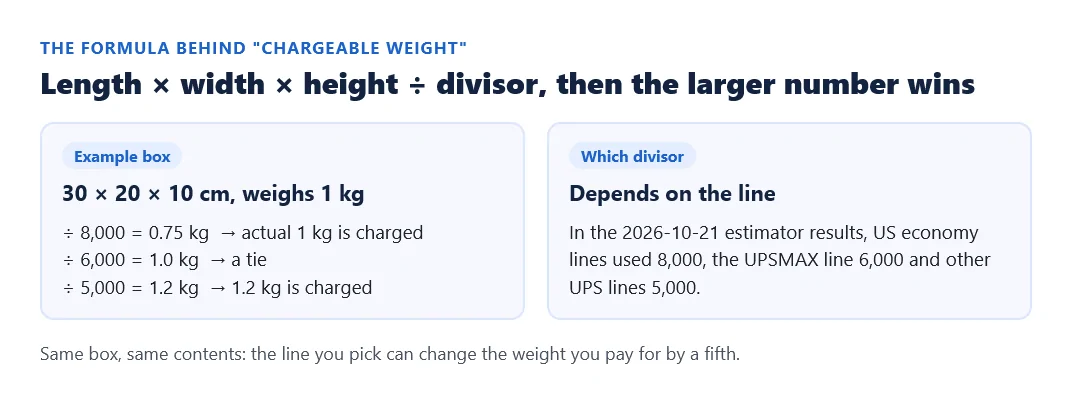
Enter the packed box size and weight, and pick the divisor of the line you are looking at. The result tells you whether the scale or the box size will set the price. The divisor shows in the line details; in our October 21 estimator results, US economy lines used 8,000 and UPS lines 5,000 or 6,000.
Order total in yuan and dollars
This adds the item stage and the parcel stage of an order into one figure before duties. Enter the store price and domestic freight in yuan, the yuan-per-dollar ratio Whalebuy shows you, the freight in dollars from the estimator, and your top-up fee. The ¥8 declaration fee is added for you. The default ratio, 6.04, is what Whalebuy's own August 2026 screenshots imply (¥49.83 shown as $8.25); use the one on your screen.
The default freight is the cheapest US line for 1 kg on October 21; the default fee is the higher of Whalebuy's two PayPal figures. Where each number comes from
Deadline clock for returns and storage
Enter the date and time an item turned "Stocked in" (or "Received", for storage). The clock gives the end of the 120-hour return window, the end of free storage, the period in which a storage extension can be requested, and the six-month limit. Times are in your device's time zone; Whalebuy's statuses use Beijing time, so allow a margin.
Store-link reader
Paste a full Taobao, Tmall, 1688 or Weidian product URL, with or without surrounding share text. The reader extracts the store and item number and builds a shorter product URL; it does not visit the seller, expand a redirect or check stock. If it cannot find an item number, open the product page in your browser and copy its address again. An unsupported store may need Whalebuy’s manual order form.
For example, a hypothetical Taobao address ending in ?id=712345678901&spm=share keeps item number 712345678901 and drops the tracking field. That tells you which listing to open, not which size or colour to buy. Continue with the option-selection step before paying.