
Whalebuy after-sales: cancelling, returning, storing and claiming on time
Every Whalebuy deadline we could find, what starts it, and what to do before it runs out.
Checked October 22, 2026Seven clocks and when each one starts
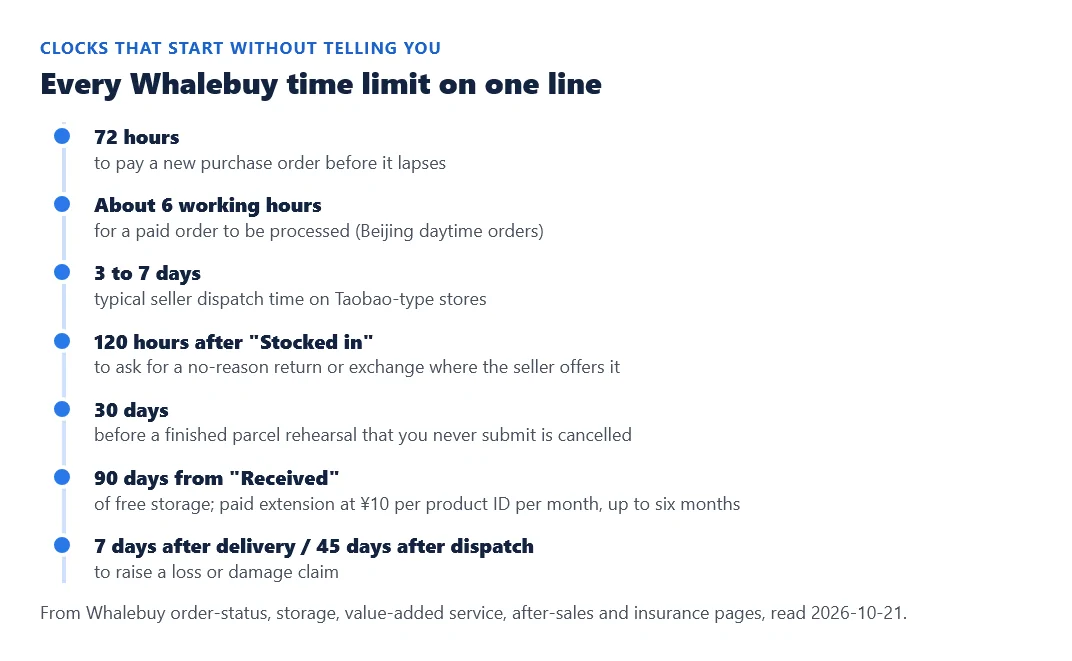
Most Whalebuy problems are solvable if you act inside a window, and most windows open silently. The 120-hour return window starts when an item turns "Stocked in"; the storage clock starts at "Received"; the claim window starts when a parcel is delivered or dispatched. None of them sends a countdown you would notice on a phone. This page lists every window we found in Whalebuy's help centre, then walks through cancelling, returning, storing and claiming in the order you might need them.
Backing out before and after the seller ships
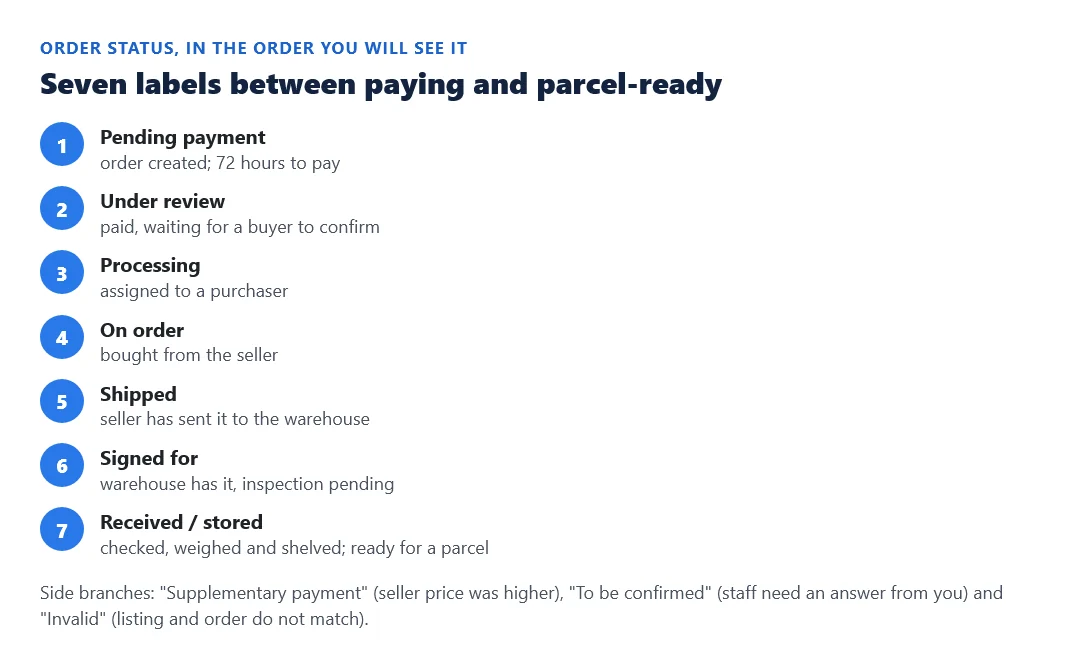
How easy it is to back out depends on the order status. While an order is pending processing you can cancel it from the order page and the money returns to your Whalebuy balance at once. While it is processing, cancelling works if the buyer has not purchased yet, with the refund in your balance within one working day. Once purchased, use the "Aftersale" button: Whalebuy asks the seller for a refund, which lands in your balance after the seller confirms, normally within about three days. If a seller marks an order as sent but the tracking number never moves, the same button starts a refund request.
Changing an option follows the same line. Before the seller ships, Whalebuy can ask the seller to change it. After the seller ships, the only route is a return once the item reaches the warehouse and a new order for the option you wanted, with the return freight on you.
| Status when you act | What you can do | Where the money goes |
|---|---|---|
| Pending processing | Cancel on the order page | Balance, immediately |
| Processing (not yet bought) | Cancel on the order page | Balance, within one working day |
| Purchased | Aftersale: refund request to the seller | Balance after seller confirms, about 3 days |
| Seller marked as sent, no movement | Aftersale: refund request | Balance after seller confirms |
| Stored, inside 5 days | Aftersale: return or exchange request | Balance after the seller receives the return |
The five-day return, and what it excludes
The five-day return or exchange is a service of the store, which Whalebuy requests on your behalf. The request must go in within five days of the "Stocked in" status, counted as 120 hours from the hour after the change, which works out to about seven days after the warehouse signed for the item. After that, the request may be refused. Even inside the window the seller decides; Whalebuy negotiates but cannot promise approval.
Some items are excluded from the start: made-to-measure goods, anything whose tags or packaging were removed at your request, newspapers and periodicals, second-hand goods, goods bought from outside the Chinese mainland, underwear, socks and leggings, adult products, and anything the seller excludes. You pay the return freight to the seller, and both legs of an exchange unless the store offers free shipping.
A practical order of operations: open the photos the day the item is stored, decide within a day or two, and use the remark field to say exactly what is wrong and which photo shows it.
Storage: 90 free days, then six months at most
Storage is free for 90 days counted from the "Received" status. Whalebuy emails a reminder before the period ends; after 90 days without a parcel submission or a reply, the goods are treated as abandoned and disposed of without further notice. If you need longer, the paid extension costs ¥10 per product ID per month, can be requested only for items stored between 60 and 90 days, and stops at six months in total.
Two edge cases. A forwarded parcel that arrives without enough information to match it to your account is kept for only 30 days from being signed for, and Whalebuy cannot remind you because it does not know whose it is; label anything you forward clearly. And the warehouse stores goods, not their shelf life, so food or anything perishable can spoil inside the free period.
Damage, loss and delay after dispatch
When the parcel arrives, look before you sign: the outer box, the seal, and whether it feels much lighter than expected. If anything is wrong, open it in front of the courier, note the problem on the delivery slip, or refuse it. If you find damage after the courier has left, keep the box and the tape and report it to your local post office within two days. Whalebuy treats a normal receipt as the end of the transport process.
For loss or damage Whalebuy compensates by each line's standard, through after-sales or online support, with the amount refunded to your balance after review. Claims are refused when the request is late (no enquiry within 7 days of delivery, or within 45 days of dispatch), when there is no proof, for force majeure, for items stolen after delivery, and for restricted or confiscated goods. Fragile items count for loss only, not breakage, however they were packed. If you bought delay insurance, a parcel that exceeds the line's 30 or 40-day standard earns back 20% of its freight.
Contact for all of this is the account's support chat or [email protected]; counterfeit reports go to [email protected]. Read Whalebuy's compensation page